


BLOG
The New NetDocuments Experience is now available to every customer

Manish Rai
VP of Product Marketing & Strategy
A reimagined matter view, workspaces for every team, and an experience anyone can pick up, built for a world where every AI token counts.
Ask anyone who works with legal documents what slows them down, and you’ll hear the same things. The document is somewhere, but where? The email that explains it was filed separately, or not at all. It’s hard to tell the latest version from the last one. And the system takes training before anyone feels at home in it.
Starting today, every NetDocuments customer can use the New NetDocuments Experience, a redesigned NetDocuments built to fix exactly that. It’s intuitive for anyone who uses Microsoft 365 or modern SaaS apps. It runs on the documents, permissions and security you already have, with nothing to migrate and no extra cost. And it’s built on an AI-native architecture, so it keeps getting richer as new capabilities arrive.
It was shaped by extensive user research with hundreds of people across law firms, corporate legal departments, and the business teams they work with. Designs were tested through interviews and usability testing until the tasks people do most were a click away. From tokenmaxxing to token rationing
A year ago, the AI conversation was all about tokenmaxxing: point AI at everything and let it read as much as it wants. Then the bills arrived. Uber reportedly used up its 2026 AI coding budget in four months. Legal AI is heading the same way, as vendors move to usage-based pricing. Tokenmaxxing has turned into token rationing.
Gartner names the cost problem directly. Without the right filtering, AI agents “overload the LLM context window with irrelevant information, exponentially inflating token consumption.” For legal teams, it warns that “without foundational improvements in document management, investments in advanced AI tools will risk falling short of expectations.”
In other words, AI is only as efficient as the way your work is organized. That’s where the New NetDocuments Experience starts.
The matter, all in one place
Legal work has never lived in one document. The story of a matter is spread across files, email, people, decisions and the work that came before, so the matter is where the redesign begins.
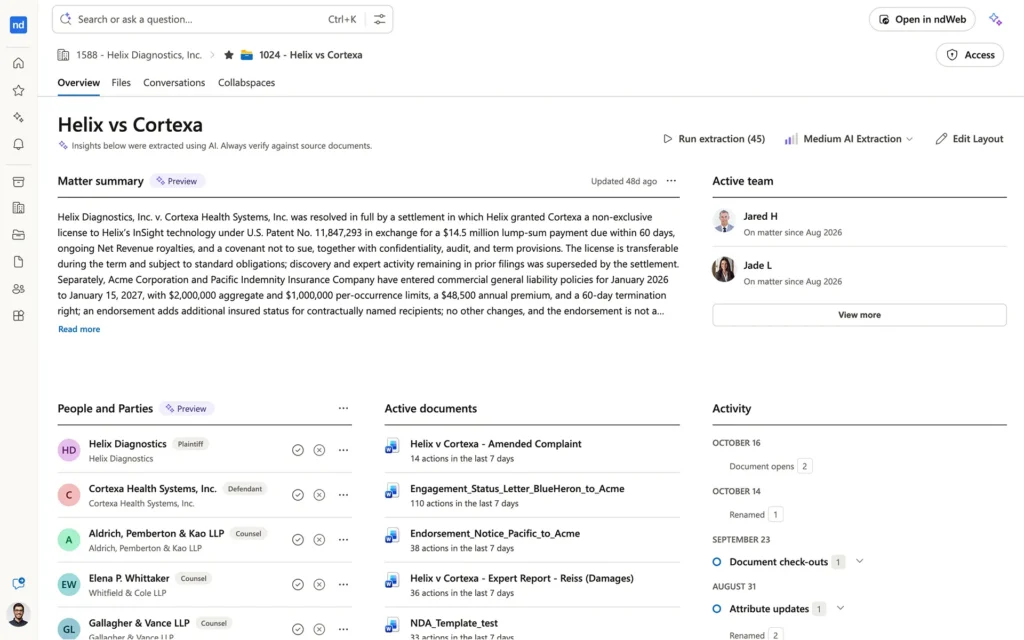
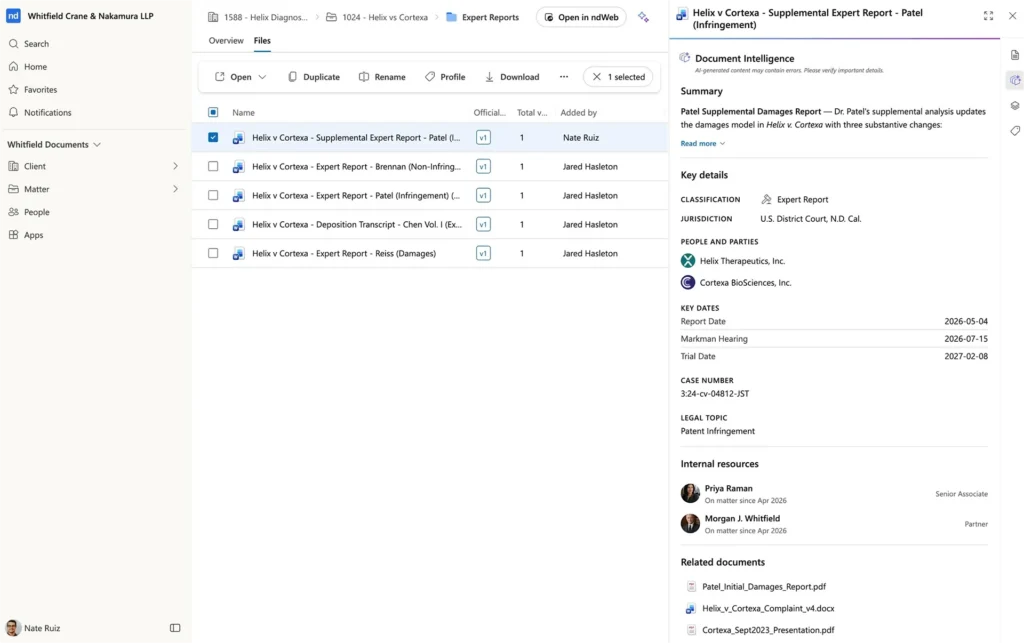
Open a matter and everything is on one page. Browse documents as a list or by folder. Preview any document and see its versions and full history alongside. Email threads filed to the matter appear as complete conversations, with every attachment next to the message that explains it. Each document’s full history shows who changed what and when, so there’s a clear, auditable record of how the work came together. With co-authoring, several people can work in the same document at once, so no one is stuck waiting for a colleague to check it back in. And you can share, move, copy or convert to PDF without leaving the page.
Every client and every matter has its own page, with all, recent and favorite views. That helps when you’re joining a new matter, preparing for a conversation, or picking up work that has moved across a team.
Workspaces for every team
A matter is one kind of workspace, and the same design works for the teams legal works with. A client, an HR case, a compliance review, a contract or a project can each have a workspace built around the details that matter for that work. The experience is modular by design. Each type of workspace carries its own fields, and everyone can search by them. For ndMAX customers, AI Profiling fills in those fields automatically as new documents arrive. The better each document is described, the less AI has to read to find the right one.
Easy to pick up
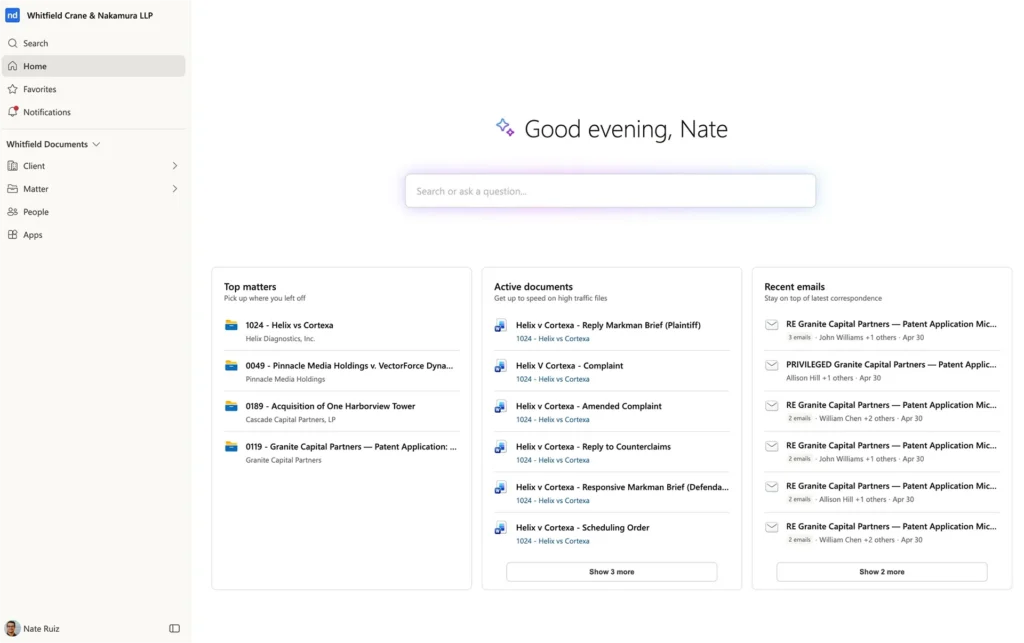
- One navigation panel, and a home page with favorites, recent work and notifications in one place
- Search results that show the matching text, so you open the right document the first time
- Routine work in fewer clicks, including moving or copying several documents at once
- Dark mode and adjustable list density
Work together in Word, PowerPoint and Excel
Also available today: new Microsoft 365 add-ins bring NetDocuments into Word, PowerPoint and Excel, and real-time co-authoring lets several people edit the same document at once, in the desktop apps or on the web.

What to Expect
AI-native, and built to get richer over time
Underneath the redesign is an AI-native architecture, built from the start for how legal work will run with AI rather than adapted to it later. That’s why the New NetDocuments Experience gets better as new intelligence arrives.
The clearest example is the Legal Context Graph, part of ndMAX, which NetDocuments introduced in May and which firms are already working with. It maps how documents, matters, people and email relate. As it comes into the experience:
Matter View
The matter view grows richer.
A summary, the key parties and the documents that matter most appear as soon as you open a matter. And AI version notes explain what changed in each version, and why.
Better search
Search gets more accurate and faster.
It finds the right document by what it means, not just the words in it.
CONTEXT FOR AI
AI starts from the full picture.
The AI tools your teams use no longer have to rebuild that picture every time.
That’s token rationing done right. In NetDocuments’ own benchmark, on a top-tier model, the Legal Context Graph cut the cost of a correct answer by 48% with no loss in accuracy, because the AI read about half as much to get there. Through MCP, the AI tools your teams choose, from Claude and ChatGPT to Microsoft Copilot, Harvey and Legora, can work from the same governed foundation.
Getting started
The New NetDocuments Experience, co-authoring, and the new Microsoft 365 add-ins are included for every customer at no additional cost. The AI capabilities described here, including AI Profiling, the Legal Context Graph and connections to the AI tools you choose, are part of ndMAX. People can move between the new and classic experiences whenever they like, so teams can switch at their own pace.
The idea behind it is simple: make it easier to see how work connects, find the knowledge your organization already has, and put that knowledge to use.
For existing customers, organizations are turned on in weekly batches, and your admins decide who gets access first.
Once you’re in, try these first: open a matter and read a filed email thread with its attachments alongside, co-author a document with a colleague, and pin your favorite workspaces to your home page.
Customers: ask your NetDocuments account manager to turn it on. Not a customer yet? Book a demo and see your own matters in it.